Posts

Maven - Create Executable Jar

Image
In this article we focus on how executable jar file is created in maven project. Usually we want to create java package and run it without specifying classpath of the main class that we want to execute. For this purpose we want to specify application entry point in the Jar manifest as follows. Manifest-Version: 1.0 Created-By: 1.7.0_06 (Oracle Corporation) Main-Class: MyPackage.MyClass So that we can execute our jar file in the terminal as follows. java -jar MyJar.jar Configuration We have to configure our pom.xml file and set packaging property as jar. <groupId>com.udara</groupId> <artifactId>tcp-client</artifactId> <version>1.0-SNAPSHOT</version> <packaging>jar</packaging> In maven we can configure jar manifest using plugins. Here we talk about few p...

Apache Tomcat - Brief Introduction

Image
What is Apache Tomcat? Apache Tomcat is an open source web sever and servlet container developed by apache software foundation. It implements Java servlet and Java Server Pages (JSP) specificartions from sun microsystems. What is Servlet? Servlet is is an app that runs on a server. Installing (1) Download and Install a Java SE Runtime Environment (JRE) (1.1) Download a Java SE Runtime Environment (JRE), release version 8 or later, from http://www.oracle.com/technetwork/java/javase/downloads/index.html (1.2) Install the JRE according to the instructions included with the release. You may also use a full Java Development Kit (JDK) rather than just a JRE. (2) Download and Install Apache Tomc...

Flutter - Create Image Container with Round Corners and Splash Effect

Image
Introduction In this article I'm going to explain you about how image with round corners and splash effect is created using Flutter widgets. Before doing some coding, let's see how images are loaded in Flutter and what the splash effect means. Images in flutter In flutter apps, we can load images from network, assets (App resources) or from the file system. Loading images from network is very easy task in flutter using Image.network constructor. Image.network( 'https://raw.githubusercontent.com/flutter/website/master/src/_includes/code/layout/lakes/images/lake.jpg', ) If you want to load images from network and cache it for offline usage, you can use CachedNetworkImage widget. You need to add cached_network_image dependency to use it. Click here to see installation instructions. CachedNetworkImage( placeholder: CircularProgressIndicator(), imageUrl: '...

Flutter - Using Fixed Width Widgets Inside ListView

Image
ListView is used to display scrollable list of widgets. Children inside ListView takes whole width of ListView by default. So elements inside ListView expands to take whole width. There are couple of ways we can set fixed width to elements inside ListView. Using Align - Set alignment property of the Align widget to Alignment.center , Alignment.centerLeft , Alignment.centerRight etc. ListView( children: [ Align( alignment: Alignment.center, child: SizedBox( width: 160.0, height: 160.0, child: Image.asset('images/default_avatar.jpg'), ), ), ], ); Using Container - In here Align widget is internally used inside Container ListView( children: [ Container( ...

Flutter - Coding Patterns

Documenting tips Programming is sometimes 60% coding and 40% documenting. So it's very useful to know about documenting tips. If you are having trouble coming up with useful documentation, here are some useful tips. Avoid checking in comments that ask questions // BAD: // What should this be? // This is a workaround. // GOOD: // According to this specification, this should be 2.0, but according to that // specification, it should be 3.0. We split the difference and went with // 2.5, because we didn't know what else to do. // TODO(username): Converting color to RGB because class Color doesn't support // hex yet. See http://link/to/a/bug/123 Avoid useless documentation // BAD: /// The background color. final Color backgroundColor; /// Half the diameter of the circle. final doub...

Bluetooth Module Interfacing with AVR

Image
Hi everyone! Today we're going to learn how to interface Bluetooth module with AVR microcontroller and how LED is controlled remotely using smartphone. In this lesson we're going to develop our own mobile application using Android Studio to communicate with the Bluetooth module. If you're not familiar with USART serial communication , please read it before going through this lesson. Interface Bluetooth Module Bluetooth module can be interfaced either by using Interrupts or without Interrupts. I recommand to use Interrupts because, we don't need to always search for UDR (USART Data Register) for received data. Here I'll show you how microcontroller is programmed in both ways. Circuit diagram First, add bluetooth library to your project and include bluetooth.h header file. Without Interrupts #include <avr/io.h> #include ...

AVR Sample Codes

Image
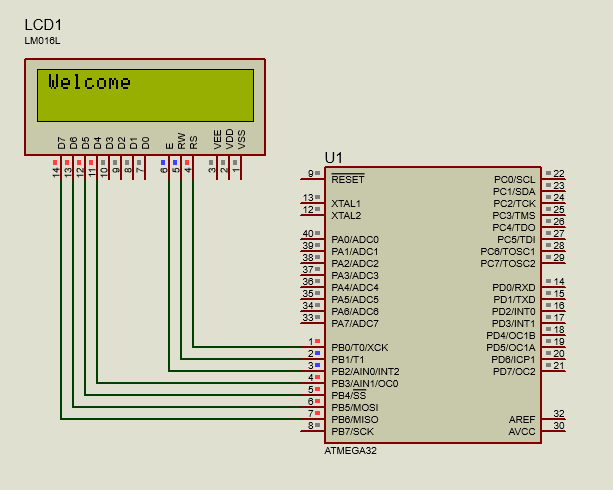
Interface LCD with AVR Circuit diagram #include <avr/io.h> #include "lcd.h" int main(void) { lcd_init(LCD_DISP_ON); lcd_puts("Welcome"); } Download Library Interface Keypad with AVR Circuit diagram #include <avr/io.h> #include "lcd.h" #include "keypad.h" int main(void) { lcd_init(LCD_DISP_ON); keypad_init(); char key; while (1) { key = scan_for_key(); if (key != 0xFF) { lcd_putc(key); } } } Download Library Interf...

Popular posts from this blog

JAudioTagger - ID3 tagger library

Flutter - Create Image Container with Round Corners and Splash Effect

Maven - Create Executable Jar